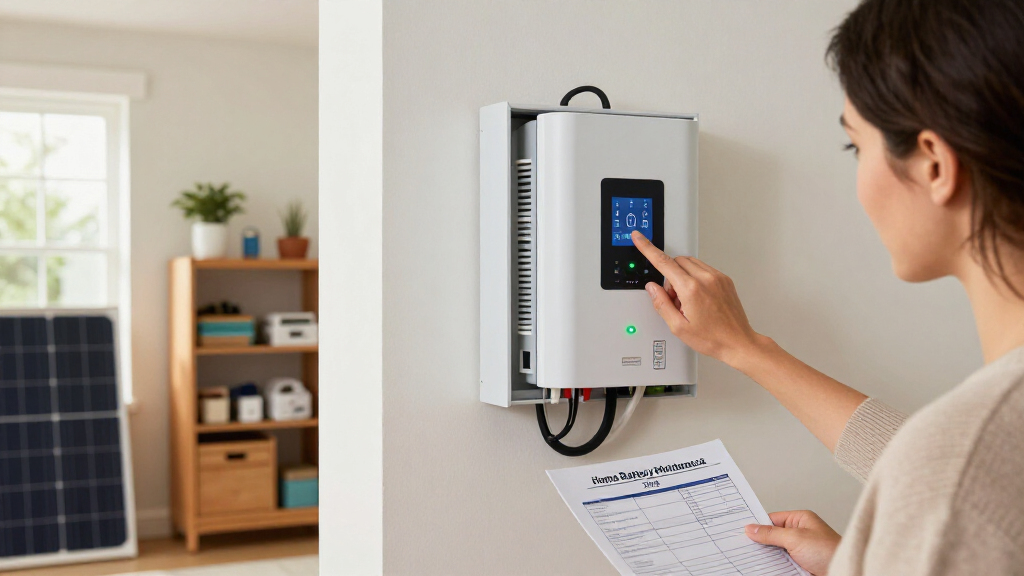

This checklist is for homeowners who want to keep a home battery system in good working order and have useful maintenance supplies on hand. Start with your system’s documentation, since battery types and installation details affect what care is appropriate.

Get backup power and energy gear delivered free with Prime
- Fast, free delivery on millions of items
- Prime Video, Amazon Music and more included
- Member-only deals all year
The sections follow practical maintenance needs: checking battery condition, caring for terminals and cables, monitoring system readings, considering temperature, and preparing for fire-related emergencies. Each slot explains what to consider and gives a pick where one was provided. The temperature sensor section is advice only, with no product pick.
Use the checklist to identify what fits your setup before buying. Confirm compatibility first: check voltage, current capacity, cable length and gauge, battery chemistry, and manufacturer guidance. For installed home storage systems, use a qualified professional for work that involves energized equipment or falls outside the manufacturer’s maintenance instructions.
Battery Load Tester
A load tester can help assess a battery’s response under load, but the right method depends on battery chemistry and the system’s design. Check the manufacturer’s testing guidance before connecting a tester; some batteries and integrated storage systems require a specific diagnostic procedure or should be evaluated through their built-in monitoring tools.
The listed pick is the Auto Meter Products SB-5/2 800 Amp Variable Load Battery and Electrica. Before choosing it, confirm that its stated capabilities and connection method suit the battery you intend to test. A common mistake is treating a tool’s maximum rating as proof that it is suitable for every battery. Match the tester to the battery and follow the specified procedure, including any limits on test duration. If the system is a high-voltage home battery or has sealed, inaccessible terminals, consult the installer rather than improvising a test.
Also consider whether you can reach the battery connections safely and whether the tester instructions cover your battery type. Use the system manual as the deciding reference; this tool is most useful when the battery maker permits the test and provides interpretable results.
What to look for:
- Confirm the battery manufacturer permits load testing.
- Check that the tester supports your battery type and system voltage.
- Review connection instructions and test-duration limits.
- Use the documented interpretation for the test result.
- Avoid testing installed equipment if access or procedure is unclear.
Auto Meter Products SB-5/2 800 Amp Variable Load Battery and Electrical System T

This battery and electrical system tester is designed for automotive and commercial starting batteries, capable of testing 6V and 12V systems. It features load testing, alternator regulation testing, and a 15-second timer, with an analog display and a cooling fan.
Pros:
- Suitable for 6V and 12V automotive and commercial batteries
- Includes multiple testing functions such as load test and alternator regulation
- Analog display provides clear readings
- Compact and portable design
Cons:
- Heavy weight (20 lbs) may affect portability
- Limited to battery and electrical system testing only
- No external volt leads or amp probe included
Best for: Owners whose battery documentation calls for a compatible variable-load test
Not ideal for: Systems that require installer diagnostics or do not permit user load testing
Bottom line: Choose a load tester only when its specifications and test procedure match the battery maker’s guidance.
Battery Terminal Cleaner
Clean, well-maintained terminals support reliable electrical connections, but terminal care should follow the battery maker’s instructions. Inspect before applying anything: residue, corrosion, or a loose connection may call for a specific cleaning and protection procedure, and some systems limit user access to terminals.
The listed pick is CRC 05046 Battery Terminal Protector. Its product name identifies it as a protector, so verify whether it also meets your needs for cleaning; protection and cleaning are different tasks. A common buying mistake is assuming a protector removes existing buildup. Check the label for the intended surface and application steps, and confirm compatibility with the battery and terminal materials. Avoid applying products to components where the manufacturer prohibits them, and never work around exposed energized connections without the required precautions.
Fit matters as much as product choice. Identify the terminal layout and access restrictions in your system documentation, and make sure you can reach the connection without disturbing cables or covers. Follow the specified isolation procedure before maintenance, and ask an installer to handle terminals that are part of an enclosed or high-voltage assembly.
What to look for:
- Check whether the product is a cleaner, protector, or both.
- Confirm compatibility with terminal and battery materials.
- Read the label for application and surface-preparation steps.
- Follow the battery maker’s isolation and maintenance procedure.
- Use a professional for inaccessible or enclosed terminals.
CRC 05046 Battery Terminal Protector

This battery terminal protector is designed to prevent corrosion on battery terminals, cables, and connectors. It provides a lead-free, soft protective coating that helps prolong battery life and ensures easier starting.
Pros:
- Protects battery terminals from corrosion
- Prolongs battery life
- Easy to apply
Cons:
- Limited information on durability
- No specific application instructions provided
Best for: Owners seeking a terminal-protection product compatible with their battery setup
Not ideal for: Anyone who needs a confirmed cleaner and has not checked the product label
Bottom line: Verify the product’s role and material compatibility before using it on battery terminals.
Battery Cable Set
Replacement cables must fit the system electrically and physically. The listed pick is a combo of 4/0 gauge cable, 10 feet black and 10 feet red, described as 100% copper welding cable. Gauge alone does not establish suitability: current, cable length, insulation, termination style, routing, and the equipment maker’s specifications all matter.
Before buying, compare the cable requirements for the inverter, battery, and any protective devices in your system. A frequent mistake is choosing cable by color or gauge without verifying the required length and connection hardware. Check the full path and endpoints, including how bends, conduit, and terminal locations affect the usable length. Confirm that the cable’s insulation and intended use are appropriate for the installation environment; welding cable wording by itself does not establish that it meets every home-energy installation requirement.
Also verify whether lugs or other terminations are included and whether their size matches the equipment studs. Do not force a cable into a tight route or substitute a different termination without approval. Have a qualified installer confirm the design for high-current battery connections, since an incorrect cable or connection can create a serious hazard.
What to look for:
- Match cable gauge and length to the system design.
- Confirm insulation and installation-environment suitability.
- Check terminal stud sizes and whether lugs are included.
- Measure the full routing path, including bends and enclosures.
- Have an installer verify high-current cable and termination choices.
4/0 Gauge 10 Feet Black + 10 Feet Red Combo Welding Cable – 100% Copper, Extra F

This EWCS combo pack includes two 10-foot lengths of 4/0 gauge welding cable, one black and one red, made from 100% copper for durability and flexibility. Rated for 600 volts and temperatures from -50°C to 105°C, it is suitable for various automotive and industrial applications.
Pros:
- High-quality 100% copper construction for durability
- Flexible and easy to handle
- UV, chemical, and oil resistant insulation
- Suitable for a wide range of automotive and industrial uses
Cons:
- Only includes two cables, limited length for large projects
- Requires proper handling due to high flexibility
Best for: Installations whose specifications call for this gauge, length, and cable construction
Not ideal for: Systems with unverified routing, terminal, or installation requirements
Bottom line: Confirm the complete cable path and equipment specifications before selecting this set.
Battery Monitor Shunt
A shunt-based monitor can provide battery-system readings, but it must be compatible with the battery bank and installed correctly. The listed pick is a LiTime 500A Bluetooth Battery Monitor for 8V-120V Systems. Verify voltage and current limits against your actual system and the monitor’s full documentation before purchase.
Common mistakes include assuming the listed voltage range guarantees compatibility with every battery chemistry, or overlooking how the shunt must be placed in the system. Check whether the monitor supports your battery type and whether the specified current capacity covers expected operation. Confirm the installation diagram and required connections with the system maker or installer. Incorrect shunt placement can make readings incomplete, while improper work on battery wiring can be hazardous.
Consider where the display or Bluetooth connection will be used, and whether the monitoring location is practical for routine checks. Check what information the product actually provides and how it is configured; do not assume that a phone connection replaces system alarms or manufacturer diagnostics. Use monitoring as one maintenance input, alongside the battery’s own instructions and any system warnings. For integrated home storage, have the installer confirm whether an external shunt is appropriate.
What to look for:
- Match the monitor’s supported voltage range to the system.
- Confirm the 500A capacity covers expected current.
- Check battery-chemistry support and configuration instructions.
- Verify shunt placement and wiring against the system diagram.
- Ask the installer whether an external shunt suits integrated storage.
LiTime 500A Bluetooth Battery Monitor for 8V-120V Systems

The LiTime 500A Bluetooth Battery Monitor allows real-time tracking of battery parameters via a mobile app, supporting various battery types and voltages. It offers customizable alerts, historical data analysis, and reliable protection features for RV, marine, and backup systems.
Pros:
- Real-time monitoring via mobile app
- Supports multiple battery types and voltages
- Customizable alerts for early issue detection
- Provides historical data for performance analysis
Cons:
- Requires smartphone app for full functionality
- Limited to 1-year warranty
Best for: Owners whose battery setup matches the monitor’s documented voltage and current limits
Not ideal for: Systems where the maker requires built-in monitoring or a different shunt arrangement
Bottom line: Confirm electrical compatibility and installation requirements before adding a shunt monitor.
Battery Temperature Sensor
Temperature affects battery operation, so monitoring may be useful when the battery maker recommends it or the system does not already report relevant readings. Check built-in monitoring first: many installed systems have manufacturer-defined sensors and limits, and adding a separate device may not provide a reliable or compatible measurement.
Choose a sensor only after confirming what temperature it should measure, where it should be placed, and how its readings connect to the battery system. A common mistake is measuring room air and treating that as battery temperature. Placement must follow the system guidance; mounting location, contact method, wiring, and supported voltage or communications can all matter. Do not attach a sensor to a battery enclosure or electrical component unless the manufacturer permits that placement.
Use the readings according to the battery documentation, including any instructions for ventilation, charging, or service when temperatures fall outside permitted conditions. Avoid relying on a standalone sensor as a substitute for built-in protections or alarms. Ask the installer about sensor integration if the system is enclosed, networked, or under warranty, and keep any added monitoring within the specified installation procedure.
What to look for:
- Determine whether the battery already reports temperature.
- Confirm the required measurement point and sensor placement.
- Check compatibility with battery chemistry and monitoring equipment.
- Follow manufacturer instructions for wiring, mounting, and response limits.
- Ask the installer before modifying an enclosed or networked system.
Battery Fire Blanket
A fire blanket may be part of household emergency supplies, but it does not replace a response plan for a battery-system incident. The listed pick is a 36-pack of fire blankets measuring 39.37 by 39.37 inches, with the product name stating heat resistance up to 1100°. Read the product’s full instructions and confirm its intended use before relying on it around battery equipment.
A common mistake is assuming a blanket is appropriate for every battery fire or can safely control a fire involving an installed energy-storage system. Battery incidents can require specific emergency guidance, and approaching a burning or damaged battery can be dangerous. Prioritize evacuation and emergency services according to your local guidance and the system manufacturer’s instructions. Treat the blanket as an emergency item only within the uses specified by its maker, not as a reason to approach a hazard.
Check dimensions, storage location, and accessibility so household members can find emergency equipment without entering a hazardous area. Review the product’s stated heat limitations and instructions, and keep it in a place consistent with the maker’s storage guidance. Plan around your installed system: ask the installer what response steps apply to its battery chemistry and location, and make sure occupants know when to leave and call for help.
What to look for:
- Verify the product’s intended fire types and use instructions.
- Check blanket dimensions against the planned storage location.
- Review the stated temperature limit and its meaning in the product documentation.
- Keep emergency equipment accessible without approaching the battery area.
- Follow system-specific evacuation and emergency-response guidance.
36 Packs Fire Blanket – 39.37×39.37 Inches, Heat Resistant up to 1100°F, Emergen

This fire blanket is made from high-quality fiberglass and can withstand temperatures up to 1100°F, making it suitable for various fire emergencies in kitchens, homes, vehicles, and outdoor settings. It is easy to use, reusable, and compact for convenient storage and quick deployment during emergencies.
Pros:
- High heat resistance up to 1100°F
- Reusable and leaves no mess
- Compact and lightweight for easy storage
- Suitable for various fire emergencies
Cons:
- Requires manual deployment, which may be challenging for some users
- Fiberglass material may cause irritation if not handled properly
Best for: Households adding an accessible blanket to a broader emergency plan
Not ideal for: Anyone expecting a blanket to control every battery-system fire
Bottom line: Treat the blanket as one emergency supply and follow the battery maker’s response guidance.
Build your checklist in a practical order: first review the battery manual and identify maintenance steps the manufacturer permits, then prioritize any compatible monitoring or inspection tools, followed by approved terminal care and correctly specified cables when needed. Compatibility comes before convenience; confirm each item against the battery and system documentation before purchasing or installing it.
Keep emergency planning alongside routine maintenance, and make sure everyone in the household knows the system’s guidance for unusual heat, damage, or alarms. A clear plan makes upkeep manageable: take one step at a time, record what the manufacturer recommends, and ask your installer when a task involves energized or enclosed equipment.