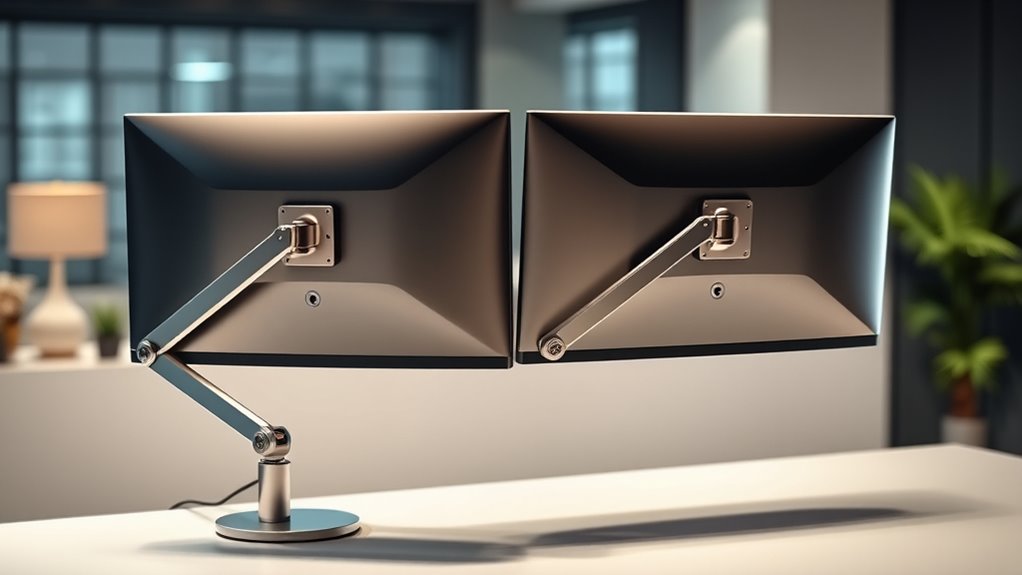

When it comes to creating an efficient dual monitor setup, adjustable monitor arms are essential for maximizing space and improving ergonomics. The EVEO Premium Dual Monitor Mount stands out as the best overall thanks to its versatile gas spring mechanism and broad size compatibility. For those prioritizing affordability, the VIVO Dual Monitor Desk Mount offers solid adjustability at a lower price point, while the Acer Dual Monitor Arm provides a reliable choice for mid-range budgets. The main tradeoffs in this category revolve around build quality, ease of installation, and weight capacity, which can influence durability and flexibility. Keep reading for a detailed breakdown of each option and find the best fit for your dual monitor setup.

Get backup power and energy gear delivered free with Prime
- Fast, free delivery on millions of items
- Prime Video, Amazon Music and more included
- Member-only deals all year
Key Takeaways
- The top picks balance ease of adjustment with sturdy build quality, crucial for long-term durability.
- VESA compatibility is a must-have feature for flexible monitor attachment, seen across all selected options.
- Gas spring arms tend to offer smoother, more precise adjustments compared to manual models.
- Weight capacity varies significantly; choosing an arm that supports your monitors’ combined weight prevents sagging.
- Installation method (clamp vs. grommet) impacts stability and workspace clearance, influencing ease of setup.
| EVEO Premium Dual Monitor Mount 14-32″ Dual Monitor Arm VESA Adjustable Height Gas Spring |  | Best Overall | Supported Screen Size: 14-32 inches | VESA Compatibility: 75×75 mm, 100×100 mm | Mounting Options: Desk clamp, Grommet mount | VIEW ON AMAZON | See Our Full Breakdown |
| VIVO Dual Monitor Desk Mount for 13-30 inch Screens, Holds 22 lbs Each, Fully Adjustable Steel Stand with C-Clamp and Grommet, Black |  | Best Value | Screen Size Compatibility: 13-30 inches | Maximum Weight per Monitor: 22 lbs | VESA Compatibility: 75x75mm, 100x100mm | VIEW ON AMAZON | See Our Full Breakdown |
| Acer Dual Monitor Arm Gas Spring VESA Mount Stand for 17-32″ Screens |  | Best for Flexible Ergonomics | Supported Screen Size: 17-32 inches | Weight Capacity: Up to 19.8 lbs per monitor | VESA Compatibility: 75×75/100×100 mm | VIEW ON AMAZON | See Our Full Breakdown |
| HUANUO 17-32 Inch Dual Monitor Stand with Adjustable Mounts |  | Best for Space-Saving Ergonomics | Size Support: 17-32 inches | Maximum Weight: 19.8 lbs per monitor | VESA Compatibility: 75x75mm, 100x100mm | VIEW ON AMAZON | See Our Full Breakdown |
| HUANUO Dual Monitor Stand – Fully Adjustable Desk Mount with Swivel VESA Bracket, C Clamp & Grommet Base for 13-32 Inch Screens, Supports 4.4-19.8 lbs per Arm, White |  | Best for Versatile Adjustability | Compatibility: 13-32 inches, 4.4-19.8 lbs | Mounting Options: C-clamp, Grommet | VESA Compatibility: 75x75mm, 100x100mm | VIEW ON AMAZON | See Our Full Breakdown |
| HUANUO Dual Monitor Stand for 13″–40″ Monitors with USB, Height Adjustable, VESA Mount, Clamp/Grommet Base |  | Best Overall Dual Monitor Arm for Versatility and Heavy Monitors | Supports Monitors: 13″–40″ | Max Weight per Arm: 26.4 lbs | VESA Compatibility: 75×75mm or 100×100mm | VIEW ON AMAZON | See Our Full Breakdown |
| Dual Monitor Stand for up to 32 inch screens, Adjustable Desk Mount for 2 Monitors, VESA Compatible, Black |  | Best for Ergonomics and Simplicity in Moderate-Sized Monitors | Monitor Size Range: up to 32 inches | Weight Capacity: 19.8 lbs | VESA Compatibility: 75x75mm, 100x100mm | VIEW ON AMAZON | See Our Full Breakdown |
| WALI Adjustable Dual Monitor Arm for 13-32 inch Screens, 22 lbs per Arm |  | Best Budget-Friendly Dual Monitor Arm with Full Motion | Compatibility: Screens up to 32 inches | Max Load Capacity: 22 lbs per arm | Mounting Options: C-clamp or grommet | VIEW ON AMAZON | See Our Full Breakdown |
| HUANUO FlowLift Dual Monitor Stand, Fully Adjustable Desk Mount for 13–32″ Screens |  | Best for Comprehensive Flexibility and Workspace Organization | Compatibility: 13–32 inches | Weight Capacity: Up to 19.8 lbs | Mounting Options: C-Clamp, Grommet | VIEW ON AMAZON | See Our Full Breakdown |
| VIVO Dual Monitor Stand, Fully Adjustable Arms for 17 to 32 inch Screens, Mechanical Articulating Desk Mount, VESA 75×75 and 100×100, Max 19.8 lbs, Black |  | Best for Versatile Adjustments and Cost-Effective Dual Support | Screen Compatibility: 17-32 inches | Weight Capacity: 19.8 lbs per monitor | VESA Pattern: 75x75mm, 100x100mm | VIEW ON AMAZON | See Our Full Breakdown |
| adjustable monitor arms for dual setup | Mounting Options | VESA Compatibility | Rotation |
|---|---|---|---|
| EVEO Premium Dual Monitor Moun | Desk clamp, Grommet mount | 75×75 mm, 100×100 mm | 360° |
| VIVO Dual Monitor Desk Mount f | C-clamp, Grommet | 75x75mm, 100x100mm | 360° |
| Acer Dual Monitor Arm Gas Spri | C-Clamp, Grommet | 75×75/100×100 mm | — |
| HUANUO 17-32 Inch Dual Monitor | C-clamp, Grommet | 75x75mm, 100x100mm | 360° |
| HUANUO Dual Monitor Stand | C-clamp, Grommet | 75x75mm, 100x100mm | Full |
| HUANUO Dual Monitor Stand for | Clamp and Grommet | 75×75mm or 100×100mm | — |
| Dual Monitor Stand for up to 3 | — | 75x75mm, 100x100mm | — |
| WALI Adjustable Dual Monitor A | C-clamp or grommet | — | — |
| HUANUO FlowLift Dual Monitor S | C-Clamp, Grommet | — | 360° |
| VIVO Dual Monitor Stand | C-clamp, Grommet | — | — |
More Details on Our Top Picks
EVEO Premium Dual Monitor Mount 14-32″ Dual Monitor Arm VESA Adjustable Height Gas Spring
This model stands out for its full motion flexibility and broad size support, making it ideal for users who need precise ergonomic adjustments. Compared with the VIVO Dual Monitor Desk Mount, EVEO’s gas spring mechanism offers smoother, effortless height and angle changes, though it adds weight and requires more desk space. It’s perfect for professionals who want a premium feel and versatile positioning but may be less suitable for lighter or smaller monitors due to its weight. The durable construction and multiple mounting options make installation straightforward and stable, while the extensive rotation and swivel range maximize ergonomic comfort. The tradeoff is that its heaviness can make frequent repositioning cumbersome, and it’s limited to monitors with VESA compatibility.
Pros:- Full motion adjustment for ergonomic comfort
- Supports a wide range of monitor sizes (14-32 inches)
- Easy to install with multiple mounting options
- Durable, high-quality metal construction
Cons:- Heavy weight may hinder frequent repositioning
- Limited to VESA-compatible monitors
Best for: Designers or programmers needing precise, full-range motion for large monitors.
Not ideal for: Users with smaller or lightweight monitors, as the mount is heavier and better suited to larger screens.
- Supported Screen Size:14-32 inches
- VESA Compatibility:75×75 mm, 100×100 mm
- Mounting Options:Desk clamp, Grommet mount
- Rotation:360°
- Swivel:+90° to -90°
- Material:High-quality metal
Our verdict“This pick makes the most sense for professionals requiring flexible, heavy-duty dual monitor setups with maximum ergonomic control.”
VIVO Dual Monitor Desk Mount for 13-30 inch Screens, Holds 22 lbs Each, Fully Adjustable Steel Stand with C-Clamp and Grommet, Black
This model offers excellent value for users who need sturdy, fully adjustable mounts for medium-sized monitors. Its steel construction guarantees stability, and the full range of tilt, swivel, and height adjustments rival more expensive options like the HUANUO 17-32 Inch Dual Monitor Stand. While it supports larger monitors up to 30 inches and 22 lbs, it involves some assembly effort that might challenge beginners. Its cable management and mounting versatility make it suitable for busy workspaces, but it’s limited by a maximum weight capacity that excludes very heavy monitors. Compared to the more premium EVEO, it offers fewer premium features but at a much lower price point, making it a compelling choice for budget-conscious setups.
Pros:- Supports monitors up to 30 inches and 22 lbs
- Fully adjustable tilt, swivel, and height
- Sturdy steel construction for stability
- Includes cable management clips
Cons:- Assembly may be challenging for beginners
- Limited to monitors with VESA 75x75mm or 100x100mm holes
Best for: Small business or home office users seeking reliable, adjustable dual mounts on a budget.
Not ideal for: Heavy-duty professional environments with very large or heavy monitors, as it supports up to 22 lbs per monitor.
- Screen Size Compatibility:13-30 inches
- Maximum Weight per Monitor:22 lbs
- VESA Compatibility:75x75mm, 100x100mm
- Mounting Options:C-clamp, Grommet
- Tilt Range:+90° to -90°
- Swivel Range:180°
- Rotation:360°
- Warranty:3 years
Our verdict“This dual mount offers a balanced mix of affordability and versatility, ideal for users with mid-sized monitors and moderate ergonomic needs.”
Acer Dual Monitor Arm Gas Spring VESA Mount Stand for 17-32″ Screens
This stand shines for its gas spring mechanism, delivering smooth, effortless adjustments for monitors between 17 and 32 inches, comparable to the EVEO’s premium feel but with a focus on ease of movement. Its flexible installation options with C-Clamp and Grommet bases make it adaptable to various desk types, though it’s less suitable for glass surfaces. The ability to support a maximum of 19.8 lbs per monitor means it’s perfect for mid-weight screens but less so for heavier models. Its max height adjustment of over 18 inches and extension up to 21 inches make it a good choice for users who prioritize ergonomic flexibility, though it requires desktop depth verification. Compared to the HUANUO 17-32 Inch Dual Monitor Stand, it offers more refined motion control but might be less ideal for very thick desks or fragile surfaces.
Pros:- Gas spring for smooth, effortless adjustments
- Supports a wide range of monitor sizes (17–32 inches)
- Flexible mounting options for stability
- High durability with over 20,000 durability tests
Cons:- Not suitable for glass or plastic desktops
- Requires desk depth verification for proper fit
Best for: Professionals who want effortless, ergonomic positioning for mid-sized monitors.
Not ideal for: Users with very thick or glass desktops, as installation might be difficult or risky on fragile surfaces.
- Supported Screen Size:17-32 inches
- Weight Capacity:Up to 19.8 lbs per monitor
- VESA Compatibility:75×75/100×100 mm
- Max Height Adjustment:18.1 inches
- Max Extension:21.25 inches
- Mounting Options:C-Clamp, Grommet
- Durability Tests:Over 20,000
Our verdict“This mount suits users valuing seamless, effortless adjustments for ergonomic comfort in medium-sized monitor setups.”
HUANUO 17-32 Inch Dual Monitor Stand with Adjustable Mounts
This stand emphasizes maximizing desk space and ergonomic flexibility for monitors up to 32 inches, with a full range of tilt, swivel, and rotation. Its adjustable height and compact design make it an appealing alternative to bulkier mounts like the WALI, especially for users with limited desk area. The cable management system helps keep clutter at bay, and its easy installation suits most users. However, the maximum monitor weight limit of 19.8 lbs might exclude some larger, heavier displays, and it’s not compatible with glass desks. Compared to the HUANUO FlowLift, it offers similar features but with a more straightforward installation process. Its narrower weight support and smaller footprint trade off some versatility for space efficiency.
Pros:- Supports large monitors up to 32 inches
- Full motion for ergonomic positioning
- Cable management for tidy workspace
- Easy to install with versatile mounting options
Cons:- Not suitable for glass desks
- Monitor weight limit of 19.8 lbs can be restrictive
Best for: Home office users with space constraints seeking ergonomic, adjustable dual monitor mounts.
Not ideal for: Heavy users with large or very heavy monitors, or glass desktop users, due to weight and surface limitations.
- Size Support:17-32 inches
- Maximum Weight:19.8 lbs per monitor
- VESA Compatibility:75x75mm, 100x100mm
- Extension Height:17 inches
- Tilt:90°
- Swivel:180°
- Rotation:360°
- Mounting Options:C-clamp, Grommet
Our verdict“This stand is perfect for space-conscious users who want ergonomic flexibility without bulky hardware.”
HUANUO Dual Monitor Stand – Fully Adjustable Desk Mount with Swivel VESA Bracket, C Clamp & Grommet Base for 13-32 Inch Screens, Supports 4.4-19.8 lbs per Arm, White
This stand offers comprehensive adjustability, supporting monitors from 13 to 32 inches and up to 19.8 lbs, with full swivel, tilt, and rotation for ergonomic comfort. It’s comparable to the WALI model but with a sleek white finish and similar full-motion capabilities. Its simple installation process, combined with cable management, makes it suitable for users seeking a clutter-free workspace. The primary limitation is that it requires monitors to have VESA mounting holes and the maximum weight limit may exclude some heavier models. Unlike the EVEO, which supports larger screens and heavier weights, this model is better suited for lighter, mid-sized monitors but excels in flexibility and aesthetics.
Pros:- Full motion for ergonomic comfort
- Supports a wide range of monitor sizes (13-32 inches)
- Supports up to 19.8 lbs per arm
- Easy to install with cable management
Cons:- Requires monitors to have VESA mounting holes
- Limited weight capacity for very heavy monitors
Best for: Users seeking a versatile, fully adjustable dual monitor mount with a clean look and straightforward setup.
Not ideal for: Heavy or very large monitors exceeding 19.8 lbs or those without VESA mounts, as compatibility is limited.
- Compatibility:13-32 inches, 4.4-19.8 lbs
- Mounting Options:C-clamp, Grommet
- VESA Compatibility:75x75mm, 100x100mm
- Swivel:Full
- Tilt:Full
- Rotation:Full
- Color:White
Our verdict“This mount is ideal for users wanting flexible, full-motion adjustment with a clean aesthetic and easy setup for light to medium monitors.”
HUANUO Dual Monitor Stand for 13″–40″ Monitors with USB, Height Adjustable, VESA Mount, Clamp/Grommet Base
This HUANUO stand stands out for supporting larger, heavier monitors up to 40 inches and 26.4 lbs per arm, making it ideal for demanding setups. Its full motion flexibility, including height adjustment up to 21.1 inches and extension of 25.59 inches, surpasses the simpler range of the VIVO stand, offering more ergonomic positioning options. Integrated USB ports and cable management boost workspace organization, but the assembly process can be complex, and the clamp/grommet compatibility may not fit all desks, especially those with thicker or irregular edges. Compared to the WALI arm, this model handles larger monitors more securely, though it’s bulkier and may require more space for full extension. This pick makes the most sense for users with large or heavy displays who want maximum adjustability and workspace tidiness.
Pros:- Supports large and heavy monitors securely up to 40 inches and 26.4 lbs
- Full motion adjustments including height, tilt, and extension
- Includes built-in USB ports for device connectivity
- Cable management system for organized workspace
Cons:- Assembly can be time-consuming and requires adjustment to find optimal positioning
- Clamp or grommet mounting may not fit all desk types or thicknesses
- Bulkier design may take up more desk space compared to smaller options
Best for: Professionals with multi-monitor workstations needing support for large, heavy screens and integrated device connectivity.
Not ideal for: Casual users with smaller monitors or limited desk space, as the larger size and weight capacity may be unnecessary and cumbersome.
- Supports Monitors:13″–40″
- Max Weight per Arm:26.4 lbs
- VESA Compatibility:75×75mm or 100×100mm
- Height Adjustment:Up to 21.1″
- Extension Length:Up to 25.59″
- Mounting Options:Clamp and Grommet
Our verdict“This stand is ideal for users needing robust support for large, heavy monitors with maximum flexibility and integrated USB ports.”
Dual Monitor Stand for up to 32 inch screens, Adjustable Desk Mount for 2 Monitors, VESA Compatible, Black
This stand is tailored for monitors up to 32 inches and 19.8 lbs, making it suitable for most office setups. Its full motion adjustments—tilt, swivel, and rotation—are comparable to the WALI arm but with slightly more straightforward installation options, thanks to both C-clamp and grommet mounting. While it provides excellent ergonomic flexibility, verifying VESA compatibility and size limits is essential, especially for larger or oddly patterned screens. Its clean, black finish complements professional environments, though the limited color choices and moderate weight capacity may restrict heavier or larger monitors. Compared with the HUANUO stand, it’s easier to install but less capable of supporting very heavy or oversized screens. This model is best for users with medium-sized monitors seeking ergonomic versatility without excessive complexity.
Pros:- Supports monitors up to 32 inches and 19.8 lbs
- Full tilt, swivel, and rotation adjustments for ergonomic comfort
- Easy to install with both C-clamp and grommet options
- Sleek black finish complements professional setups
Cons:- Limited to monitors up to 32 inches and 19.8 lbs, restricting larger or heavier screens
- Assembly may be tricky for some users due to multiple adjustment points
- Color options are limited to black, reducing aesthetic flexibility
Best for: Office workers or students with up to 32-inch monitors prioritizing ergonomic adjustments and straightforward setup.
Not ideal for: Power users with large or heavy monitors over 19.8 lbs, or those requiring more extensive extension range.
- Monitor Size Range:up to 32 inches
- Weight Capacity:19.8 lbs
- VESA Compatibility:75x75mm, 100x100mm
- Adjustments:Tilt 90°, Swivel 180°, Rotation 360°
- Extension:Up to 19.5 inches
- Height Adjustment:Up to 16.9 inches
Our verdict“This stand offers solid ergonomic support for medium-sized monitors and is a good fit for typical office environments.”
WALI Adjustable Dual Monitor Arm for 13-32 inch Screens, 22 lbs per Arm
Compared to the HUANUO stand, the WALI arm offers similar full motion capabilities—tilt, swivel, and rotation—at a more accessible price point. It supports monitors up to 32 inches and 22 lbs per arm, making it suitable for most typical office or home setups. Its durable metal construction ensures steady support, and the cable management helps reduce clutter. However, the maximum extension of 19.3 inches and height of 17.3 inches may limit flexibility for larger desks or more complex ergonomic needs. Its installation is straightforward but may require some patience to verify VESA compatibility and weight limits, especially on desks with crossbeams or uneven surfaces. This makes it a solid choice for budget-conscious users who want full motion without extra frills.
Pros:- Supports monitors up to 32 inches and 22 lbs per arm
- Full motion adjustments including tilt, swivel, and rotation
- Durable metal construction for stability
- Multiple mounting options for flexible installation
Cons:- Extension and height limits may restrict ergonomic flexibility for some desks
- Limited to monitors up to 32 inches and 22 lbs, excluding larger or heavier screens
- Installation can be slightly complex for some users
Best for: Home office users or students needing a cost-effective solution for supporting monitors up to 32 inches with full motion adjustments.
Not ideal for: Users with very large or heavy monitors exceeding 22 lbs, or those seeking extensive extension or height range.
- Compatibility:Screens up to 32 inches
- Max Load Capacity:22 lbs per arm
- Mounting Options:C-clamp or grommet
- Adjustments:Tilt, swivel, rotation
- Extension:Up to 19.3 inches
- Height Adjustment:Up to 17.3 inches
Our verdict“This arm provides a budget-friendly, full-motion solution for standard-sized monitors with reliable support.”
HUANUO FlowLift Dual Monitor Stand, Fully Adjustable Desk Mount for 13–32″ Screens
The HUANUO FlowLift stands out for its full range of motion, supporting 13 to 32-inch monitors with weights up to 19.8 lbs. Its maximum height of 15.75 inches and versatile tilt, swivel, and rotation adjustments allow for highly customizable ergonomic setups. The dual mount offers flexible placement, ideal for users seeking precise positioning. Installation options include both C-clamp and grommet mounts, but the stand is best suited for desks with specific materials and thicknesses. Its somewhat lower maximum height compared to other models might limit standing or very high mounting preferences, and setup can be tricky on desks with cross beams. Compared with the VIVO stand, it offers more adjustment but requires careful installation on compatible desktops. This model is perfect for users who want detailed ergonomic control and a tidy workspace.
Pros:- Fully adjustable with tilt, swivel, and rotation for ergonomic comfort
- Supports a range of 13–32-inch monitors and weights up to 19.8 lbs
- Includes both C-Clamp and Grommet mounting options
- Helps organize workspace with cable management
Cons:- Requires specific desk materials and thicknesses for proper installation
- Maximum height of 15.75 inches may not suit all ergonomic preferences
- Installation can be complex on desks with cross beams or panels
Best for: Professionals or students prioritizing maximum ergonomic customization and workspace decluttering on compatible desks.
Not ideal for: Users with non-wooden desks or those requiring very high monitor placement, as installation and height are somewhat limited.
- Compatibility:13–32 inches
- Weight Capacity:Up to 19.8 lbs
- Mounting Options:C-Clamp, Grommet
- Tilt:+85°/-50°
- Swivel:±90°
- Rotation:360°
Our verdict“This stand is best for users seeking detailed ergonomic control and a tidy workspace on compatible desks.”
VIVO Dual Monitor Stand, Fully Adjustable Arms for 17 to 32 inch Screens, Mechanical Articulating Desk Mount, VESA 75×75 and 100×100, Max 19.8 lbs, Black
The VIVO stand offers a practical balance of adjustability and affordability for monitors between 17 and 32 inches, with a maximum weight of 19.8 lbs per arm. Its fully articulating arms support tilt, swivel, and rotation, similar to the WALI but with a slightly more straightforward assembly process. While the clamp and grommet mounts provide flexible installation options, some users report the clamp’s stability on thinner desks can be less secure, and the arms may extend past the desk edge, potentially obstructing workspace. Compared to the HUANUO models, it’s more budget-friendly but with a slightly lower weight capacity and less robust support for larger monitors. This makes it ideal for users seeking flexible, adjustable support on a tight budget, especially when desk space is limited.
Pros:- Adjustable tilt, swivel, and rotation for customized viewing angles
- Supports monitors from 17 to 32 inches with VESA compatibility
- Cost-effective and easy to assemble
- Helps save desk space with dual mount setup
Cons:- Maximum weight per monitor is 19.8 lbs, limiting larger screens
- Arms may extend past desk edges, potentially obstructing workspace
- Clamp mount may be less stable on very thin or uneven desks
Best for: Home users or students needing affordable, fully adjustable dual-monitor support for typical office or study setups.
Not ideal for: Users with larger or heavier monitors over 19.8 lbs or those with very thick desks that exceed clamp limits.
- Screen Compatibility:17-32 inches
- Weight Capacity:19.8 lbs per monitor
- VESA Pattern:75x75mm, 100x100mm
- Mounting Options:C-clamp, Grommet
- Max Top Thickness:3.1 inches (clamp), 1.9 inches (grommet)
- Warranty:3 years
Our verdict“This stand provides flexible, budget-friendly dual monitor support suitable for most standard setups and moderate monitor sizes.”

How We Picked
Each product was evaluated based on performance, durability, usability, and value. We prioritized models with versatile height and tilt adjustments, strong build quality, and broad compatibility with different monitor sizes and VESA standards. Ease of installation and cable management features also played a role, as these factors directly affect user experience. The ranking reflects a balance between premium features and affordability, ensuring options suit a range of needs and budgets. Products that excelled in stability, smooth movement, and long-term reliability earned higher placement in this list.| adjustable monitor arms for dual setup | Mounting Options |
|---|---|
| EVEO Premium Dual Monitor Moun | Desk clamp, Grommet mount |
| VIVO Dual Monitor Desk Mount f | C-clamp, Grommet |
| Acer Dual Monitor Arm Gas Spri | C-Clamp, Grommet |
| HUANUO 17-32 Inch Dual Monitor | C-clamp, Grommet |
| HUANUO Dual Monitor Stand | C-clamp, Grommet |
| HUANUO Dual Monitor Stand for | Clamp and Grommet |
| Dual Monitor Stand for up to 3 | — |
| WALI Adjustable Dual Monitor A | C-clamp or grommet |
| HUANUO FlowLift Dual Monitor S | C-Clamp, Grommet |
| VIVO Dual Monitor Stand | C-clamp, Grommet |
Factors to Consider When Choosing Adjustable Monitor Arms For Dual Setups
Choosing the right adjustable monitor arm for a dual setup involves considering several key factors that influence usability and comfort. Beyond basic compatibility, understanding the tradeoffs between features like weight capacity, adjustment mechanisms, and mounting options can help you make an informed decision. The right choice depends on your workspace, monitor size, and personal ergonomics preferences. Keep these considerations in mind to avoid common pitfalls like insufficient support or difficult adjustments.Monitor Size and Weight Capacity
Ensuring your monitor arm can support your specific monitor sizes and weights is fundamental. Most dual arms specify a maximum weight per arm; exceeding this can lead to sagging or instability. Take note of your monitors’ combined weight and opt for an arm with a comfortable margin to prevent long-term wear. Larger, heavier screens benefit from arms with higher weight capacities and robust mounting hardware, so don’t underestimate your needs for future upgrades.
Adjustment Mechanisms
Gas spring arms provide smoother, more effortless adjustments, ideal for frequent repositioning or ergonomic fine-tuning. Manual arms are typically more affordable but may require more effort to reposition. Consider how often you’ll need to adjust your monitors and choose an arm that offers the right balance of ease and precision. Remember, the quality of the adjustment mechanism impacts long-term stability and user comfort.
Mounting Type and Compatibility
Deciding between clamp and grommet mounts influences both stability and workspace clearance. Clamps are generally easier to install and remove, suitable for desks without grommet holes, but may not be as stable as grommet mounts for heavy setups. Grommet mounts offer a more secure attachment, especially for heavier monitors, but require access to a hole in your desk. Confirm that your desk setup supports your preferred mounting method before purchasing.
Adjustability and Range of Motion
Look for arms that offer comprehensive adjustability—height, tilt, swivel, and rotation—to customize your ergonomic position. The range of motion impacts how easily you can position your monitors for optimal comfort and productivity. Be cautious with arms that have limited tilt or rotation, as they may restrict your setup options. Flexible adjustment features reduce strain and help create a clutter-free workspace.
Cable Management and Aesthetics
Effective cable management features help keep your workspace tidy and prevent tangling. Many dual monitor arms include built-in channels or clips for routing cables, which also protect cords from wear. A sleek design enhances the overall look, especially in professional environments. Don’t overlook these features, as they contribute significantly to a clean, organized workspace that encourages productivity.
Frequently Asked Questions
Can I use a dual monitor arm with different monitor sizes?
Yes, most adjustable dual monitor arms support different monitor sizes, provided they are within the supported weight and VESA compatibility ranges. Many arms are versatile enough to hold a 24-inch and a 32-inch monitor simultaneously, for example. Check each arm’s specifications for maximum size and weight per monitor to ensure stability and proper support. Mixing sizes can be a practical way to customize your workspace, but be mindful of the overall weight load.
Are gas spring monitor arms more durable than manual ones?
Gas spring arms generally offer smoother, more consistent adjustments, which can prolong usability if quality components are used. However, they rely on internal hydraulics that may degrade over time, especially in lower-cost models. Manual arms tend to be more straightforward and less prone to mechanical failure but can be less convenient for frequent repositioning. Investing in a well-reviewed gas spring model often provides better longevity and ease of use.
Is VESA compatibility essential for dual monitor arms?
VESA compatibility is a fundamental requirement for most adjustable arms because it ensures the monitors can be securely attached. Most modern monitors support VESA mounts, but it’s worth double-checking your specific models’ VESA hole pattern and size. An arm that is VESA-compatible offers greater flexibility, allowing you to switch or upgrade monitors without replacing the entire setup. Without VESA compatibility, compatibility issues and limited options are common.
What’s the best way to mount dual monitor arms on a glass desk?
Mounting on a glass desk requires special clamps designed for glass surfaces or alternative solutions like adhesive mounts. Most standard clamps are not suitable for glass, as they can cause damage or slip. Consider a clamp with rubber padding or a mounting system specifically engineered for glass desks. Grommet mounts are typically not feasible unless your glass desk has a pre-drilled hole, so confirm the mounting method’s compatibility with your desk surface before purchasing.
How do I choose an arm that supports future monitor upgrades?
To future-proof your setup, select an arm with a higher weight capacity and larger VESA compatibility range. This provides flexibility for larger or heavier monitors down the line. Additionally, opting for a model with full adjustability and a sturdy build ensures it can handle different sizes and weights without sagging or needing replacement. Considering these factors can save money and hassle if you decide to upgrade monitors later.
Conclusion
For general use and top performance, the EVEO Premium Dual Monitor Mount stands out as the best overall choice, especially for users who need smooth adjustments and broad compatibility. The VIVO Dual Monitor Desk Mount offers excellent value for those on a budget, providing reliable functionality without sacrificing quality. If you’re seeking a premium, feature-rich solution, the Acer Dual Monitor Arm delivers robust support and premium build quality. Beginners or casual users will find the HUANUO Dual Monitor Stand straightforward to install and adjust, while professionals with larger setups should consider models with higher weight capacities. Tailor your choice to your workspace, monitor size, and ergonomic needs to find the perfect dual arm system in 2026.Halloween Picks

11.2-Foot Halloween Inflatable Pumpkin with LED Lights

10.5 ft Lighted Pumpkin and Ghost Halloween Inflatable Archway

12.2 ft Halloween Inflatable Outdoor Decoration – Giant Pumpkin
As an affiliate, we earn on qualifying purchases.