Finding the right surge protector for DC fast charging used to mean choosing between protecting your devices and charging them quickly. That compromise has mostly disappeared. Today’s options combine genuine USB-C Power Delivery fast charging with real surge protection, spare AC outlets, and even ambient lighting — all in units that cost less than a single replacement phone charger. But the three formats on the market suit very different situations, and picking the wrong one means either tripping over a cord you didn’t need or wishing you had one.

Get backup power and energy gear delivered free — and shop member deals
- Fast, free delivery on millions of items
- Access to Prime Big Deal Days deals on October 6–7
- Prime Video, Amazon Music and more included
After comparing the field, three options stand out. The Surge Protector Wall Outlet Extender with 6 Outlets and 20W USB-C PD earns my top spot for turning a single wall receptacle into a ten-device charging station with the highest surge rating of the group. The Power Strip Surge Protector with 5 Outlets and 35W PD is the pick when you need reach and raw charging speed — its 35W port and 6-foot flat cord make it the most flexible option for desks and nightstands that aren’t next to an outlet. The Maxpw Surge Protector Outlet Extender rounds out the lineup as the most physically secure choice, thanks to a screw lock and support rod that keep it firmly anchored to the wall.
The main tradeoffs to weigh: wattage versus stability. The power strip charges faster but sits loose on a desk; the wall extenders are rock-solid but cap out at 20W. Surge ratings also differ, from 800 to 1050 joules, and one unit carries a 10A limit that matters if you plan to run power-hungry appliances alongside your chargers. I break all of this down below so you can match the right unit to your setup rather than paying for capacity you won’t use.
Key Takeaways
- The power strip delivers the fastest USB-C charging at 35W, while both wall extenders top out at 20W — enough for phones and tablets but not laptops.
- Both wall extenders offer 1050-joule surge protection, a step above the power strip’s 800-joule rating, making them better for expensive home electronics.
- The power strip’s 6-foot flat cord adds placement flexibility the wall-tap units can’t match, but its 10A/1250W ceiling is lower than the extenders’ 15A/1875W capacity.
- The Maxpw extender is the only option with a screw lock and support rod, solving the wobble problem common to plug-in outlet extenders.
- All three units include multiple USB-A ports alongside USB-C, so legacy cables and older devices stay covered no matter which you choose.
| Surge Protector Wall Outlet Extender with 6 Outlets, 4 USB Ports (20W USB-C PD), Night Light, Black |  | Best Overall | AC Outlets: 6 | USB Ports: 4 (1 USB-C PD 20W, 1 USB-C, 2 USB-A) | Voltage: 125VAC | VIEW LATEST PRICE | See Our Full Breakdown |
| Power Strip Surge Protector with 5 Outlets, USB-A and USB-C Charging, and 6 ft Flat Cord |  | Best for Fast Charging and Placement Flexibility | AC Outlets: 5 (widely spaced) | USB Ports: 2 USB-A, 2 USB-C | USB-C PD Output: 20W and 35W | VIEW LATEST PRICE | See Our Full Breakdown |
| Maxpw Surge Protector Outlet Extender with 6 Outlets and 4 USB Ports | 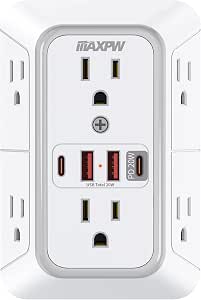 | Best for a Rock-Solid Wall Installation | AC Outlets: 6 (wide-spaced) | USB Ports: 4 (2 USB-C, 2 USB-A) | USB-C1 Output: 20W PD | VIEW LATEST PRICE | See Our Full Breakdown |
| DC fast charging surge protector | AC Outlets | USB Ports | Voltage | Max Power |
|---|---|---|---|---|
| Surge Protector Wall Outlet Ex | 6 | 4 (1 USB-C PD 20W, 1 USB-C, 2 USB-A) | 125VAC | 1875W / 15A |
| Power Strip Surge Protector wi | 5 (widely spaced) | 2 USB-A, 2 USB-C | 110–125V | 1250W / 10A listed |
| Maxpw Surge Protector Outlet E | 6 (wide-spaced) | 4 (2 USB-C, 2 USB-A) | 125V | 1875W / 15A |
More Details on Our Top Picks
Surge Protector Wall Outlet Extender with 6 Outlets, 4 USB Ports (20W USB-C PD), Night Light, Black
This option takes the top spot because it solves the most common charging-station problem in one move: one wall receptacle becomes ten powered connections. The 3-sided layout puts outlets on the front and both side faces, and the 2.2-inch spacing between them means chunky wall adapters for cameras, smart speakers, and baby monitors sit side by side without blocking each other. Compared with the Maxpw extender, which has the same outlet count, this one’s three-sided arrangement spreads the ports across more physical space, which matters if your plugs trend bulky.
The 20W USB-C PD port delivers genuine fast charging for iPhones, Galaxy phones, and tablets — expect a modern smartphone to reach roughly 50 percent in about half an hour. That said, it isn’t a laptop port, and buyers hoping to run a MacBook or a Windows ultrabook off it should look at the power strip instead, whose 35W PD output crosses into entry-level laptop territory. The remaining three USB ports (one USB-C at standard speed, two USB-A) handle earbuds, Kindles, and older cables without monopolizing the fast port.
Where this unit separates itself from both competitors is the 1050-joule surge rating paired with ETL certification and lifetime protection coverage. That is the highest absorption rating in this lineup, and the lifetime backing means the manufacturer expects the suppression components to last. The smart dusk-to-dawn night light, with three brightness levels, is a quiet bonus that makes this a natural fit for hallways, kids’ rooms, and guest bathrooms — places where the light sensor earns its keep and the Maxpw’s static setup offers nothing comparable.
The honest limitation is the plug itself. It requires a compatible duplex outlet, and if your home has decora-style receptacles, GFCI outlets in odd positions, or half-switched outlets, you’ll want to verify fit before ordering. There’s also no physical anchoring system like the Maxpw’s screw lock, so heavy cables can introduce some wobble. Neither drawback outweighs the overall package for most buyers, which is why it leads this comparison.
Pros:- 10-in-1 design converts one outlet into 6 AC sockets plus 4 USB charging ports
- 20W USB-C PD fast charging tops up phones and tablets quickly
- 3-sided layout with 2.2-inch spacing fits bulky wall adapters without blocking
- Dusk-to-dawn night light with 3 brightness levels adds hallway and bedroom utility
Cons:- USB output tops out at 20W, so laptop charging is off the table
- Requires a compatible standard duplex outlet — check receptacle type before buying
- No screw lock or support rod, so heavy cables can cause slight wobble
Best for: Households that want a single-outlet charging station with fast phone charging, maximum surge protection, and a built-in night light for hallways, bedrooms, or guest rooms.
Not ideal for: Anyone who needs to charge a USB-C laptop, or whose outlets are non-standard receptacles where a plug-in extender won’t seat properly.
- AC Outlets:6
- USB Ports:4 (1 USB-C PD 20W, 1 USB-C, 2 USB-A)
- Voltage:125VAC
- Max Power:1875W / 15A
- Plug Type:Type A/B (North American)
- Special Features:Fast charging, night light, light sensor, surge protection
- Certification:ETL
- Warranty:Lifetime protection
Our verdict“The most complete all-around package: the highest surge rating in the group, true fast charging, and thoughtful layout details that make it the default pick for most homes.”
Power Strip Surge Protector with 5 Outlets, USB-A and USB-C Charging, and 6 ft Flat Cord
Where this power strip earns its place is simple: it is the only option here that reaches where you actually sit. The 6-foot flat cord slips behind furniture and along baseboards, and the flat plug hugs the wall so beds and desks can sit flush against it. Both wall extenders require your devices to come to the outlet; this one brings the outlets to your nightstand, workbench, or sofa-side table. The triangular body sits stably on a desk, and wall-mountable design lets you hang it under a desk or beside a headboard when surface space runs out.
Charging is where it pulls ahead of the extenders. The 35W USB-C PD port is the fastest in this comparison — enough to fast-charge a phone and to power smaller USB-C laptops like a MacBook Air at entry speed, something neither wall extender can manage. The second USB-C port delivers 20W, and two 10W USB-A ports round out a total 65W of USB capacity across the four ports. One honest caveat: the headline fast-charge figures are quoted for a port used on its own, so splitting load across ports will slow things down. Buyers charging one primary device at a time get the full benefit.
The tradeoffs are real. Its 800-joule surge rating sits below both extenders’ 1050 joules, and the 10A / 1250W maximum (the listing also mentions 15A in places, an inconsistency worth noting) is lower headroom than the extenders’ 1875W — I’d avoid pairing it with a space heater or hair dryer. The three-color night light is a pleasant touch, though less refined than the dusk-to-dawn sensor on my top pick since it relies on preset colors rather than automatic brightness.
Compared with the surge wall extender, this model makes the most sense for anyone whose seating or sleeping spot is far from an outlet, or who wants the fastest single-port charging in the group. Skip it if the unit will sit permanently next to an existing wall receptacle — a wall extender does that job with fewer cables on the floor and a stronger surge rating.
Pros:- 6 ft flat cord with low-profile plug reaches desks and beds that wall extenders can’t
- 35W USB-C PD port is the fastest charging output in this lineup
- Sits on a desk or mounts on a wall depending on your space
- Overload protection plus a three-color night light adds everyday utility
Cons:- 800-joule surge rating trails both wall extenders’ 1050 joules
- Stated fast-charge output applies when a port is used alone; multi-port charging is slower
- Listed specs mix 10A and 15A maximums, leaving some ambiguity about true capacity
Best for: Desk setups, nightstands, and workspaces away from the wall outlet — especially anyone who wants to fast-charge a USB-C laptop alongside their phone.
Not ideal for: Permanent installations right beside an existing outlet, or anyone planning to run high-draw appliances that need more than 10A of headroom.
- AC Outlets:5 (widely spaced)
- USB Ports:2 USB-A, 2 USB-C
- USB-C PD Output:20W and 35W
- USB Total Power:65W
- Cord Length:6 ft (2 m), flat plug
- Voltage:110–125V
- Max Power:1250W / 10A listed
- Extra Features:Overload protection, three-color night light, wall-mountable
Our verdict“The pick for reach and raw charging speed — its 35W port and 6-foot cord outclass the extenders, provided you accept the lower surge rating and amperage ceiling.”
Maxpw Surge Protector Outlet Extender with 6 Outlets and 4 USB Ports
The Maxpw addresses the single biggest complaint about plug-in outlet extenders: they wobble, sag, and gradually work loose under the weight of charging cables. Its remedy is a screw lock that anchors the unit to the outlet’s faceplate screw hole, plus a rear support rod that braces the body against the wall. Once installed, it feels like a permanent fixture rather than a accessory hanging off your receptacle. Neither competitor offers this — my top pick relies on plug friction alone, and the power strip trades wall stability for cord reach entirely.
Electrically, it mirrors the leader closely: 6 AC outlets, 4 USB ports, and 1050 joules of surge protection, with the same 1875W / 15A ceiling. That shared capacity means the choice between the two extenders comes down to form rather than performance. The Maxpw arranges its outlets across a flat, more compact face (3.54 × 5.31 × 1.72 inches), which some buyers will prefer for tight spaces behind furniture, though the three-sided layout of my top pick handles very bulky adapters a little more gracefully.
Charging splits into a 20W PD USB-C1 port and a 15W USB-C2, alongside two USB-A ports — the same phone-and-tablet tier as the leader, and again short of laptop capability. Note that the 20W figure applies when USB-C1 is used alone, so simultaneous charging pulls speeds down. The ETL certification and multiple layers of protection (overload, over-voltage, short-circuit) put it on equal safety footing with the rest of the lineup.
Its quirks are installation-related. The rear support rod may need trimming to clear USB receptacles or GFCI outlets, which turns a five-minute install into a mild DIY job for anyone with those outlet types. And unlike the surge wall extender, there’s no night light, so hallway or nursery duty goes to the leader. But if your priority is a ten-device charging station that never budges — a kitchen counter, a workshop bench, a family charging corner — this is the one that stays put.
Pros:- Screw lock and support rod anchor it firmly — no wobble or gradual loosening
- Powers up to 10 devices simultaneously from a single outlet
- Wide-spaced outlets accommodate bulky power adapters
- ETL certified with overload, over-voltage, and short-circuit protection
Cons:- USB-C1 reaches its 20W rating only when used alone
- Rear support rod may require trimming to fit USB outlets or GFCI receptacles
- No night light feature, unlike the competing wall extenders
Best for: High-traffic charging stations like kitchen counters, entryway tables, and workshops where a securely anchored extender won’t shift under a tangle of cables.
Not ideal for: Buyers with GFCI or USB-equipped receptacles who don’t want to trim the support rod, or anyone who wants a built-in night light.
- AC Outlets:6 (wide-spaced)
- USB Ports:4 (2 USB-C, 2 USB-A)
- USB-C1 Output:20W PD
- USB-C2 Output:15W
- Max Power:1875W / 15A
- Voltage:125V
- Dimensions:3.54 × 5.31 × 1.72 inches
- Mounting:Screw lock with rear support rod
Our verdict“The most physically secure charging station of the three — equal surge protection to the leader, anchored installation, and a compact footprint that suits busy shared spaces.”
How We Picked
I evaluated these three surge protectors through the lens of a single question: which one best protects and fast-charges a modern device collection? That meant looking beyond marketing specs and focusing on the details that actually change the ownership experience.
The first filter was fast-charging capability. Every option had to include at least one USB-C Power Delivery port capable of true fast charging, not just a USB-C port shaped like one. I also checked whether the stated wattage applied when multiple ports were in use, since shared-output quirks are one of the most common disappointments with budget charging hardware.
Second, I compared surge protection ratings and electrical capacity. Joule ratings measure how much energy a protector can absorb before it stops protecting, so the difference between 800 and 1050 joules is a real distinction for anyone plugging in expensive gear. I also weighed maximum amperage and wattage, because a protector that chokes on a space heater or hair dryer alongside your chargers is a hidden limitation.
Third, I judged physical design and fit. Outlet spacing, cord length, mounting options, and stability features determine where a unit can actually live. A wall extender that wobbles or blocks the second receptacle is a worse product than its spec sheet suggests, which is why the Maxpw’s support rod earned real consideration.
Finally, I factored in certifications and protection coverage. ETL listing signals independent safety testing, and lifetime protection policies indicate the manufacturer stands behind the surge suppression components. Combined, these criteria produced a lineup where each product wins a different scenario rather than three near-identical choices.
Factors to Consider When Choosing Best DC Fast Charging Surge Protectors
All three of these units pair surge protection with USB-C fast charging, but they answer different needs. Before choosing, it helps to understand the specs that actually separate a good charging surge protector from a frustrating one.Joule Rating: How Much Protection You’re Buying
A surge protector’s joule rating measures the total energy it can absorb over its life before its protective components are spent. Higher numbers mean longer-lasting protection against spikes from lightning nearby, grid switching, and large appliances cycling on. In this lineup, both wall extenders offer 1050 joules while the power strip carries 800 joules. The gap isn’t enormous — anything above 600 joules is reasonable for general electronics — but if you’re plugging in a television, game console, or expensive audio gear, the higher rating buys more margin. For a nightstand with a phone and an e-reader, the difference matters far less.
USB-C PD Wattage: Matching the Port to Your Devices
Power Delivery wattage determines what a USB-C port can actually charge. 20W fast-charges virtually every smartphone and handles tablets at a moderate pace, but it falls short of most laptops. 35W enters entry-level laptop territory, covering devices like a MacBook Air, though larger pro laptops still need dedicated chargers. Also watch for shared-output behavior: many budget units quote peak wattage for a single port used alone, and splitting across ports reduces speeds on all of them. If you regularly charge two phones at once, look at total USB output (like the power strip’s 65W combined) rather than the headline number.
Form Factor: Wall Extender vs. Power Strip
A wall outlet extender is ideal when an outlet is already where you need power — it adds ports with zero cable clutter and nothing on the floor. Its weaknesses are placement inflexibility and, on some models, physical wobble. A power strip with a long cord solves distance: it reaches desks, beds, and workbenches far from the wall, and flat plugs let furniture sit flush. The cost is a cord to manage and a unit occupying floor or desk surface. A simple test: if your devices already live within arm’s reach of an outlet, choose an extender; if you’d need to stretch a cable to reach where you actually sit, the strip wins by default.
Amperage and Total Capacity
Check the maximum amperage and wattage if you plan to run anything beyond chargers. Both extenders here support 15A / 1875W, which comfortably covers most household electronics and even smaller appliances. The power strip is listed around 10A / 1250W (with some conflicting 15A claims), which means you should avoid pairing it with space heaters, hair dryers, or other high-draw devices. Overloading a power strip is both a safety issue and a nuisance-trip issue, so buy capacity above what you expect to plug in.
Stability, Outlet Spacing, and Fit
Details that don’t show up in headline specs often decide satisfaction. Wide outlet spacing (around 2 inches or more) lets bulky adapters coexist without blocking neighbors. Anchoring features like a screw lock keep wall extenders from sagging under cable weight — the Maxpw’s support rod is the strongest example here. And always verify your receptacle type: standard duplex outlets accept all three of these units, but decora outlets, GFCI receptacles, and USB-equipped wall plates can interfere with fit or require modifications.
Frequently Asked Questions
Can these surge protectors charge a laptop?
It depends on the laptop and the port. The power strip’s 35W USB-C PD port can charge slim laptops like a MacBook Air, a Dell XPS 13, or most Chromebooks, though it will charge them slowly under heavy use. The two wall extenders top out at 20W, which is enough for fast phone and tablet charging but generally below what laptops require — a 13-inch laptop may charge very slowly or simply maintain its current battery level. If laptop charging is a priority, the power strip is the only option in this comparison that makes sense, and even then, gaming laptops and larger pro machines will still need their dedicated chargers.
Do the fast-charging speeds hold up when multiple USB ports are used at once?
Not fully, and this is one of the most common misunderstandings with multi-port charging hardware. The quoted wattages — 20W or 35W — typically apply to a single port used alone. When you plug into two or more USB ports simultaneously, the available power is divided among them, so each device charges more slowly. The Maxpw explicitly notes this for its USB-C1 port, and the power strip’s fast-charge examples also assume single-port use. If you routinely charge several devices overnight, this barely matters since there’s time to spare; if you need a quick 30-minute top-up before leaving the house, use the fast port on its own.
Is 800 joules of surge protection enough, or do I need 1050?
For phones, tablets, lamps, and chargers, 800 joules provides reasonable everyday protection against the small surges that come from grid fluctuations and appliances cycling on and off. The 1050-joule extenders simply have more absorption capacity, meaning their protective components last longer against repeated small surges and offer more headroom during larger events like nearby lightning strikes. My guidance: use the higher rating for anything you’d be upset to replace — a TV, a game console, a desktop monitor — and treat 800 joules as perfectly acceptable for a nightstand or a desk charging station for handheld devices. Both ratings are far better than plugging directly into an unprotected outlet.
Why does a wall outlet extender wobble, and does it matter?
Plug-in extenders hang off the outlet’s receptacle contacts with no other support, so the weight of the unit plus several charging cables creates leverage that makes them sway, sag, or slowly work loose. Beyond being annoying, a loose extender can wear the receptacle contacts over time and occasionally interrupt power to your devices. The Maxpw solves this with a screw lock and support rod that anchors it to the outlet cover plate, making it feel like a fixed installation. The other extender relies on plug friction alone, which is usually fine with lightweight cables but can loosen under heavier cords. If you’re installing an extender in a spot where it will be bumped, tugged, or loaded with six cables, the anchored design is worth choosing.
Will these work with GFCI outlets or non-standard receptacles?
Generally yes, but with caveats worth checking before you buy. All three units use standard Type B, 3-prong plugs that fit ordinary duplex outlets. On GFCI receptacles — the kind with test and reset buttons found in kitchens and bathrooms — the Maxpw’s rear support rod may need to be trimmed to sit flush, and some oversized GFCI faceplates can physically block a plug-in extender. Decorstyle outlets, USB wall plates, and half-switched receptacles can also interfere with fit or function. My suggestion is to look at the exact outlet where you plan to install the unit and compare it against the product dimensions; the power strip avoids most of these issues entirely since it simply plugs in at floor level with its cord doing the reaching.
Conclusion
Each of these three surge protectors wins a different scenario, so the right choice comes down to where you’ll use it and what you’ll plug in.
For most households, the Surge Protector Wall Outlet Extender (B0HB4P1WH3) is the pick I’d start with. It combines the group’s highest surge rating, genuine 20W fast charging for phones and tablets, an outlet layout that swallows bulky adapters, and a night light that makes it genuinely useful in bedrooms and hallways. Choose it unless you specifically need a long cord or laptop charging.
Choose the Power Strip Surge Protector (B0G6JDXKJC) if distance or laptop charging is the deciding factor. Its 6-foot flat cord reaches desks and beds far from the wall, its 35W port is the only laptop-capable output here, and wall-mounting adds placement options. Accept the lower 800-joule rating and 10A ceiling as the price of that flexibility — and keep space heaters off it.
Choose the Maxpw Outlet Extender (B0H4QNNBBK) when stability is non-negotiable. For kitchen counters, entryway tables, workshops, and any spot where a tangle of cables would drag a lesser extender loose, its screw lock and support rod make it the one that stays put. It matches the leader’s surge protection and capacity; you give up the night light and may need to trim the rod on GFCI outlets.
Whatever you choose, all three deliver the combination that matters most: real surge protection for your electronics and fast USB-C charging without a drawer full of separate adapters. Match the format to your room, verify your outlet type, and you’ll end the era of crawling behind furniture to swap chargers.
Evergreen bestsellers Picks
bestsellers
As an affiliate, we earn on qualifying purchases.